
Last time, we covered the stage the AI works on: paths, the terminal, reading Python, and virtual environments. I ended with a warning: AI changes code boldly, and sometimes ruthlessly. Today is about surviving that. We're building a safety net.
Commits are save points
Let's start with the intuition. Here's how I put it in class:
Vibe coding without commits is like playing a hard game without saving.
Someone always asks, "Doesn't Ctrl+S already save?" Good question, but they're completely different things. Ctrl+S keeps only the latest state. Git lets you go back to any point: yesterday at 3 p.m., or last week.
That makes a commit message a note to your future self. A good message is one that tells you at a glance, months later, what that commit was.
Save points aren't the whole story, though. Git also gives you a structure that lets many people work on the same code together. Real team collaboration is beyond where we are, so today we'll look at Git purely as a way to make save points.
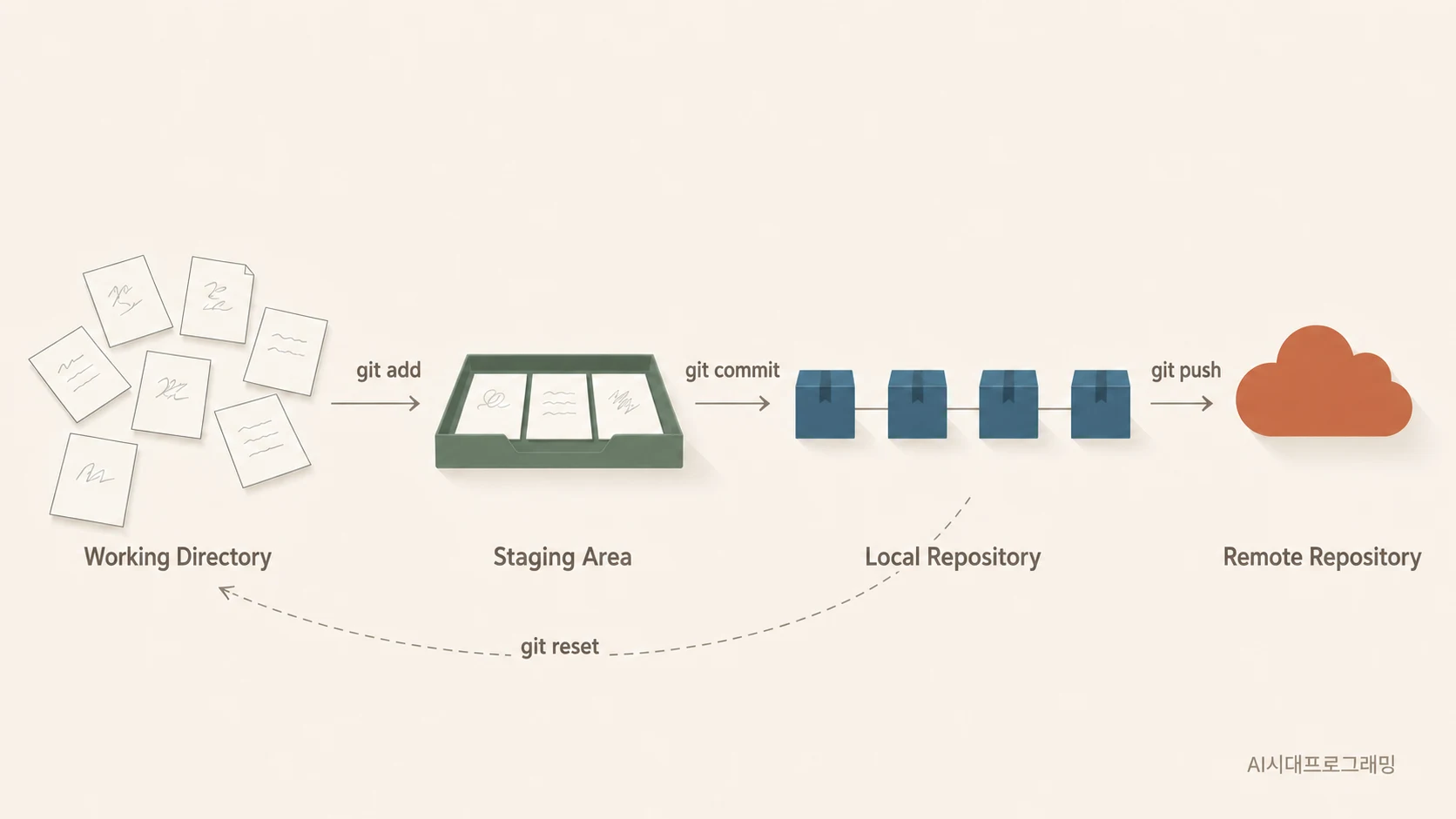
GPT drew this to help us see the flow. There's no shortage of Git tutorials out there, so I won't link any in particular.
1. Cashing in the claim from part 1
In part 1, I quoted DORA's 2025 finding that AI is an amplifier. The natural follow-up question is:
If AI is an amplifier, what do we want it to amplify?
DORA's report lists capabilities that amplify AI's benefits, and two of them form the backbone of this class: strong version control (today) and working in small batches (next time). In DORA's description, strong version control means many small commits rather than big blocks, practiced rollback, and clear commit messages; teams that can roll back quickly and safely can afford to experiment more boldly.
Then there are two numbers from Faros AI's engineering telemetry. On teams using AI heavily, pull requests got 51% bigger, and incidents per pull request rose about 243%. The chunks got bigger and the incidents more than tripled. Without a way to undo changes, there's nothing you can do about it.
So here's today's iron rule. If you take away one sentence, make it this one:
2. The three steps of Git
Now for how it actually works. Git moves in three steps:
- Working folder: you edit the code.
git add: you put what you want to save onto the stage.git commit: you record it as a save point.
As commands:
git init                                  # start tracking this folder with Git
git add .                                 # put everything on the stage
git commit -m "Finish allowance calculator"   # save!
To check your work, git log --oneline lists your save points and git diff shows what changed.
Then create a .gitignore. Git wants to track everything in the folder, so you list what must never go up:
.env
venv/
__pycache__/
Why list .env before it even exists? In part 5 it will hold secrets like API keys, and if you plan to add the line "later," you'll forget, and that's how accidents happen. It's safer to have it there already. (And since it starts with a dot, you won't see it in your normal file browser.)
3. Exercise: break it on purpose, then roll back
You don't strictly have to go this far, but it's worth learning in your hands that you can go back.
# 1. Save the current state
git init && git add . && git commit -m "Part 1 result"
# 2. Ask the agent: "Rewrite this code in a completely different style."
# 3. See what changed
git diff
# 4. Return to the last commit
git restore .
The code comes right back. In class, this is where we all clap, because it's the moment you know, in your hands and not just your head, that "even if the AI wrecks it, I can undo it."
Why does that matter? Because that experience is what lets you experiment boldly next time. Once you know you can go back, the fear goes away. Without it, asking the AI to do anything starts to feel risky.
4. Branches divide the blast radius, not the features
Now branches. I explain them with a tree.
main is the trunk. Each time you build a feature, you grow a branch. If it works out, you graft it onto the trunk (merge); if it fails, you cut off the whole branch.
A lot of people take branches to mean "a way to split up features." That's not it:
A scenario makes it obvious. Say you built a shift-schedule page, then a lookup page, then a login page, all on main, one after the other. Now you find that the schedule page, the very first thing you built, was broken, and everything stacked on top of it misbehaves too.
To roll back, you lose the lookup and login work as well. If they'd been on separate branches, you'd only need to fix the schedule branch.
5. The trap beginners fall into
But wait. Almost everyone who learns branches falls into the same trap. I did too.
You think, "I'll merge it when the feature is finished." Then the branch lives for days, or weeks.
Large projects often adopt a strategy called Git Flow, with separate branches such as feature, develop, hotfix, and main. But when you're developing alone and keep building on one branch for a long time, it can get hard to merge back into main later.
So rather than living on one branch, it's better to merge as soon as a piece is done. Plenty of other developers have written about running into exactly this problem; here's one post comparing Git Flow with trunk-based development (in Korean).
The longer a branch lives, the further it drifts from the trunk, until it can't be merged at all. That's called merge hell, and trunk-based development, the approach used at large companies like Google, exists to avoid it.
In the age of AI, the risk is much bigger. As we saw, the size of each change has already grown about 51%. If agents pour out code on two branches at once, conflicts multiply fast.
So I set these rules:
- Default: merge a branch into
mainwithin a day. - When to merge: not when the feature is done, but when nothing is broken.
- If it's going to take longer: don't add branches; split the feature.
- Mark safe points:
git tag v1-workingmeans "everything up to here definitely works." - Undo:
git restoreif it's only on your machine;git revertif you've already pushed it.
Personally, I think the third rule is the key. Instead of keeping a branch alive, cut the work smaller. It's exactly the same principle as "ask for small pieces," which comes next time.
The commands themselves are simple:
git switch -c feature/greeting    # grow a branch
# ...do the work...
git add . && git commit -m "..."
git switch main                   # back to the trunk
git merge feature/greeting        # graft the branch on
git branch -d feature/greeting    # tidy up the finished branch
6. A new commit rule for the AI era
This is the part I personally find most interesting. When people wrote all the code by hand, committing per feature came naturally. But an agent changes several files at once.
So the rule changes:
That buys you two things. Your history becomes a record of what you asked the AI to do, and the unit you roll back matches the unit of work.
It doesn't have to be this strict every time. Usually we give the AI one feature at a time and then do a bit of debugging, so the idea is to commit after each round of request plus fixes, the way you'd save a game.
One more habit worth adding: note in the commit message whether you checked the result.
✗ "Fixed stuff"
✓ "Add greeting feature (ran it myself and checked)"
Six months later, git log tells you which commits were verified. It seems minor, but it really pays off later.
7. Git and GitHub are different things
One last point. A surprising number of people think these are the same. They aren't.
- Git is a tool: the save feature itself, running on your computer. It works without the internet.
- GitHub is a service: a website that stores your code in the cloud.
If Git is Ctrl+S, GitHub is Google Drive. GitHub gives you three things: a cloud backup, a portfolio, and the starting point for deployment in part 5.
Some people always get stuck on authentication when they git push. If that happens, the GitHub Desktop app lets you push with a few clicks, so you don't have to wrestle with the terminal. Still, I recommend installing Git and using it from the terminal.
Also, installing an extension like Git Graph in your editor gives you an at-a-glance view of your history, which is handy.
Today's summary
- Safety rule #1: always commit before asking the AI for a big change.
- Recovery: knowing just
git restoregives you a safety net. .gitignore: keeps out what must never be uploaded (.envcomes in part 5).- Branches: divide the blast radius, and keep them short, under a day.
- Commit unit: one AI request, one commit.
- GitHub: cloud backup, portfolio, and the starting point for deployment.
Now that you can undo anything, you can give bold instructions and fix things freely. Next time, we learn how to hand work to an AI properly, and how to review and approve its plan before any code is written (plan mode).
Sources
- DORA, State of AI-assisted Software Development 2025: strong version control and working in small batches as capabilities that amplify AI's benefits.
- Faros AI, Key takeaways from the DORA Report 2025: the telemetry figures for pull-request size (+51%) and incidents per pull request (about +243%).
- Trunk Based Development: an overview of keeping branches short.